Verify credentials online
In the two examples below, a user is purchasing an age-restricted product online. The user has a supported credential that would prove their age in GOV.UK Wallet, such as a mobile driving licence (mDL) which conforms to ISO 18013-5 standard.
In these examples the website selling the product (relying party) must get proof of the user’s age before completing the transaction. To work with GOV.UK Wallet, the website must use a registered DVS certified against the trust framework.
There are more details about the credentials available in GOV.UK Wallet that you can use in your verification process.
OID4VP same device flow
You should use the same device flow when your user’s GOV.UK Wallet credentials are held on the same device as the one they’re currently using.
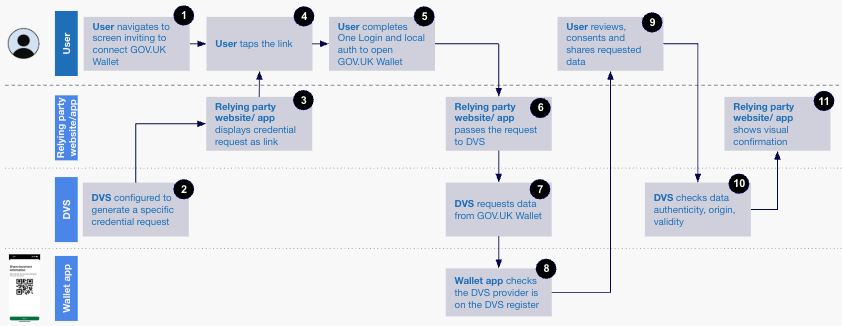
The data flow for this is:
During their purchase, the relying party directs the user to a DVS to prove their age. The user chooses to connect this DVS to their GOV.UK Wallet.
The DVS used by the relying party’s website is configured to generate a specific credential request. In this example, the credential request would include confirmation that the user is above the age needed to complete the transaction.
The relying party’s website or embedded DVS displays the credential request to the user as a link.
The user clicks on the link, which opens the GOV.UK One Login app.
To open GOV.UK Wallet, the user authenticates themselves with GOV.UK One Login and uses the device’s local authentication (face, fingerprint, PIN or pattern).
The relying party passes the request to the DVS.
The DVS requests the data it needs from GOV.UK Wallet. In this example, the data needed is the mDL’s
age_over_18attribute.GOV.UK Wallet checks that the DVS provider is on the DVS Register.
The user reviews the requested data, consents to share it, and allows it to be shared with the DVS and the relying party.
The DVS checks the data’s authenticity, origin and validity, and passes it to the relying party.
The relying party website shows a visual confirmation of the credential verification. If the verification was successful and the user has proven their age, they can continue with the transaction.
OID4VP cross device flow
You should use the cross device flow when your user’s GOV.UK Wallet credentials are held on a different device to the one they’re currently using.
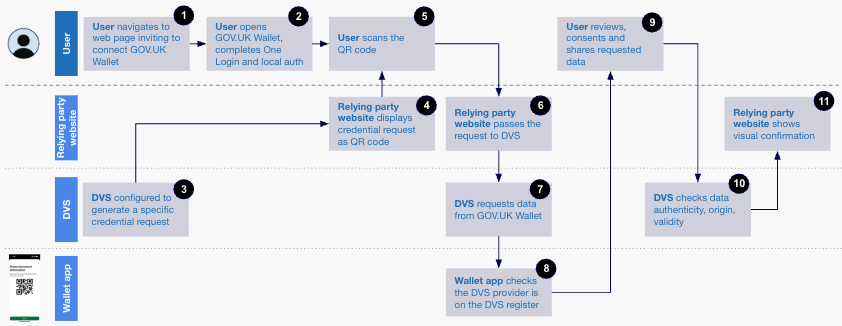
The data flow for this interaction is as follows.
During their purchase on their laptop or tablet, the relying party directs the user to a DVS to prove their age. The user chooses to connect this DVS to their GOV.UK Wallet app on their phone.
To open GOV.UK Wallet on their phone, the user authenticates themselves with GOV.UK One Login and uses the device’s local authentication (face, fingerprint, PIN or pattern).
The DVS used by the relying party is configured to generate a specific credential request. In this example, the request would include a confirmation that the user is above the age needed to complete the transaction.
The relying party displays the credential request to the user as a QR code.
The user scans the QR code using GOV.UK Wallet on their phone.
The relying party passes the request to the DVS.
The DVS requests the data it needs from GOV.UK Wallet. In this example, the data needed is the mDL’s
age_over_18attribute.GOV.UK Wallet checks that the DVS provider appears on the DVS Register.
The user reviews the requested data, consents to share it, and allows it to be shared with the DVS and the relying party.
The DVS checks the data’s authenticity, origin and validity, and passes it to the relying party
The relying party shows a visual confirmation of the credential verification. If verification was successful and the user has proven their age, they can continue with their purchase.