Verify credentials in person
GOV.UK Wallet will allow users to share their credentials in person, for example when purchasing age-restricted products at a supermarket. This process will use the ISO 18013-5 standard to let you verify a user’s credentials in person. You will only be able to access user information through a digital verification service (DVS). The DVS must be:
- certified under the UK digital identity and attributes trust framework
- on the digital identity and attribute services register (DVS register)
For in-person credential verification, GOV.UK Wallet will support the following:
| Feature | Support at launch |
|---|---|
| Device engagement | QR code |
| Handover session establishment | Not supported |
| Reader authentication | Supported |
| Session encryption | Only with Curve P-256 for ECDH/ECDSA |
| Data retrieval | Via Bluetooth only, using GATT protocol for transmission where the holder takes the Peripheral role and acts as the GATT server |
| Device signature | COSE EdDSA signatures only |
We’ll publish further details of how we’ll support these features, including GOV.UK Wallet’s verification profile, in future updates to this documentation.
Understand GOV.UK Wallet’s in-person sharing flow
This diagram shows an overview of how GOV.UK Wallet will handle in-person credential sharing to let users share their information with your verifier implementation via the GOV.UK One Login app. This diagram, and the descriptions below it, are an explanation of each step in the process.
The credential holder opens the GOV.UK One Login app containing their mobile driving licence to present their information.
The GOV.UK One Login app begins device engagement and generates a QR code that contains device engagement information and the app’s ephemeral public key.
The verifier opens the verifier app on their device.
Using the verifier app, the verifier scans the QR code displayed on the credential holder’s device.
The verifier app begins session establishment by sending its ephemeral public key to the GOV.UK One Login app, and attempts to establish a secure Bluetooth connection.
The two devices establish a secure connection, and create a unique session key to encrypt the data shared during the session.
During the session establishment, the verifier app sends its presentation request. This request contains details of the credential holder information the verifier wants to verify.
The GOV.UK One Login app receives the presentation request from the verifier’s app, and requests consent from the credential holder to share their data.
The credential holder consents to share the requested information with the verifier app.
The GOV.UK One Login app sends a presentation back to the verifier app. The presentation contains the information that the credential holder consented to share.
The verifier app checks the presentation, its signature and its issuer. It also checks that the credential is still valid.
The verifier app displays a confirmation of the result to the verifier.
How in-person verification looks for your users
In this example, a user is purchasing age-restricted products in person and sharing their information with a business. They have a valid mobile driving licence stored on their personal device in their GOV.UK Wallet.
The business selling the products (the relying party) uses a device with a verification service provided by a suitable DVS provider to verify the user’s age. In this example, the verification service is provided via a verifier app (it could, for example, also be a point of sale terminal, QR scanner terminal etc.). To work with GOV.UK Wallet, the DVS provider must be certified against the trust framework and appear on the DVS register.
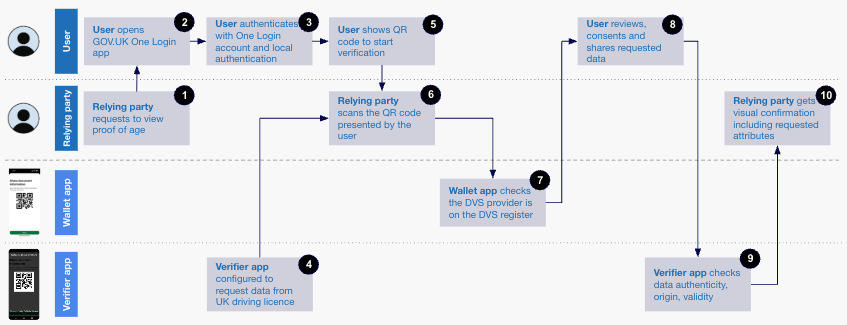
The data flow for this interaction is as follows:
The relying party (the business selling the product) asks the user to show proof of their age.
The user opens the GOV.UK One Login app.
To access the GOV.UK One Login app, the user authenticates themselves with GOV.UK One Login and also uses their device’s local authentication (face, fingerprint, PIN or pattern).
The verifier app on the relying party’s device is configured to request data from the user’s mobile driving licence. For this transaction, the data requested is a proof of age.
GOV.UK Wallet generates a QR code on the user’s device, which the user shows to the relying party to begin the verification process.
The relying party scans the QR code using the verifier app.
GOV.UK Wallet confirms that the verifier app is using a trust framework certified and DVS-registered provider.
The user reviews the data that was requested (for example an ‘over 18’ attribute), consents to share it, and allows it to be shared with the verifier app.
The verifier app checks the data’s authenticity, origin and validity.
The verifier app shows the relying party a visual confirmation of the user’s proof of age.